



September 2026 was one of the busiest months of Google announcements this year. A longer-than-usual spam update began rolling out, Search Console started reporting image-led searches, Google Ads tested text ads inside AI Mode, and Google moved further towards keeping discovery, comparison and even checkout on its own surfaces.
This roundup covers every significant Google update from September 2026 across SEO, paid search, local search, ecommerce and analytics. For each one, you will find what changed, who it affects and what to do next, along with practical insights from Pranav Jha, Founder and Director of AP Web World Pvt. Ltd., who has led SEO, content, paid media and performance reporting for businesses across India and international markets since founding the Noida-based agency in 2012. If you only need the action items, skip to the checklist near the end.
Table of Contents
ToggleSeptember 2026 at a Glance
Date | Update | Most relevant for |
Sep 2 | Google Trends adds category filters to Explore | Content teams |
Sep 2 | Gemini 3.8 Flash added to AI Mode | AI search / GEO teams |
Early Sep | Agentic checkout in AI Mode and Gemini for eligible US Shopify merchants | Ecommerce |
Sep 3 | Personalized alcohol ads on YouTube announced (effective Oct 30) | Alcohol advertisers |
Sep 3 | Exact and phrase match text ads tested in AI Mode | PPC |
Sep 8 (approx.) | AI dashboards go live in Google Ads accounts | PPC, reporting |
Sep 14 | Google Business Profile “Collected Info” tab | Local SEO |
Sep 14 | AI contribution pilot for publishers reported | Publishers |
Mid-Sep | AI video dubbing in Google Ads Asset Studio | Video advertisers |
Sep 18 | Merchant Center product reviews supported via API | Ecommerce |
Sep 18 | Discover tests AI topic overviews (“Dive deeper”) | Publishers |
Sep 21 | Offline data can fill gaps in tag-based conversions | PPC, measurement |
Sep 21 | GA4 hostname include filter | Analytics |
Sep 24 | Search Console multimodal search filter | SEO, ecommerce |
Sep 24 | September 2026 spam update begins | All websites |
Sep 25 | Customer Match accepts IP address and timestamp | PPC, legal |
Sep 28 | AI Mode monitoring rolls out to all Google app users | Ecommerce, local |
Sep 29 | Pilot payout figures reported | Publishers |
SEO and Search Updates
Google’s September 2026 Spam Update
Google released the September 2026 spam update on September 24. It applies globally, covers all languages, and Google said the rollout could take up to two weeks.
That timeline stands out. This is the fourth spam update of 2026, following releases in March, June and August, and each of those earlier rollouts finished within roughly three days. A two-week window points to a broader update than the ones before it.
What to do:
- Mark September 24 in your reporting so that traffic changes from late September onward can be read in context.
- Avoid reactive changes until Google confirms on its Search Status Dashboard that the rollout is complete.
- If a site loses visibility, segment performance by page or directory to identify exactly which sections were affected, then review those pages against Google’s spam policies.
Sites that already follow Google’s spam policies generally have little to worry about. The bigger risk during a long rollout is mistaking normal volatility for a penalty.
Pranav Jha’s advice is to build foundations rather than react to every fluctuation: “Spam updates and AI experiments will keep coming. Sites that follow Google’s guidelines, publish genuinely useful content and spread their traffic across search, direct, email and social channels are far better placed than those chasing every update.”
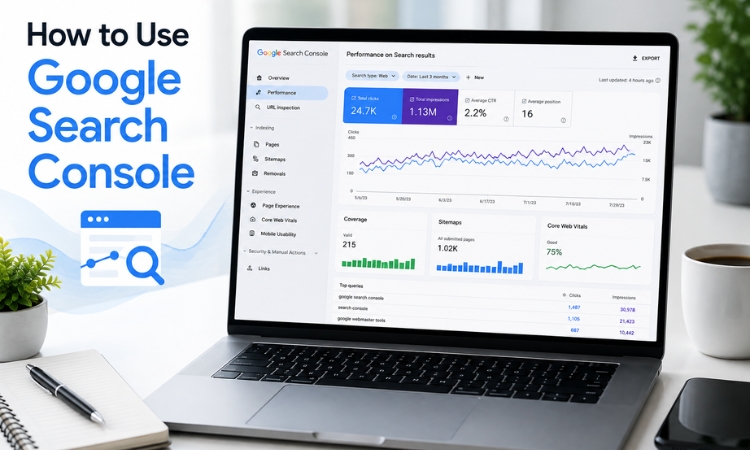
Search Console Adds a Multimodal Search Filter
Also on September 24, Google added a new filter to the Search Console Performance report. Under the Web search type, you can now choose between two options:
- Text-based: web searches typed as text.
- Multimodal: web searches where the user searched with an image, photo or screenshot, whether through Google Lens, Circle to Search, an image upload in Google Search or Chrome’s right-click “Search this image” option.
This activity was not previously visible in your reports, so many sites will see impressions rise from late September. The extra visibility is welcome, but treat it as a reporting change rather than a sudden jump in demand when you compare month-over-month figures, particularly in client reports.
A few limitations apply:
- Query data is not available for multimodal traffic, because the search input is an image rather than text.
- The filter also appears in the Generative AI performance report, which continues to show impressions but not clicks.
Who should check this first: ecommerce stores and sites in visual categories such as fashion, furniture, home décor and recipes. The multimodal view shows which of your pages people reach by photographing a product or taking a screenshot.
Google Discover Tests AI Topic Overviews
On September 18, Robby Stein, VP of Product for Google Search, announced a Discover experiment: a “Dive deeper” button that opens a short AI-generated topic overview with prominent links to related stories, community reactions and original reporting. The test starts with video cards.
For news publishers, this matters a great deal. NewzDash’s analysis of more than 400 news publishers found that Discover now accounts for roughly two-thirds of Google traffic to news sites. Meanwhile, some large publishers, including the UK’s Reach, have reported Google referrals falling by nearly half, with Discover identified as the main cause.
Google describes the links inside these overviews as prominent. Publishers heard similar assurances when AI Overviews arrived in Search, and Search Console data since then has shown how few clicks those links tend to deliver. If Discover overviews expand beyond this test, sites that rely on Discover should prepare for further pressure on clicks.
What to do: track Discover performance separately in Search Console, and reduce dependence on any single Google surface by building direct, email and social audiences.
Google Trends Adds Category Filters to Explore
On September 2, Google Trends added category filters to its Explore page. You no longer need to enter a search term first. Choose a category such as Books & Literature, set a region and time frame, and Trends shows what is gaining attention in that category. If Google places a keyword in an unrelated category, you can exclude that category.
Trending-topic discovery was previously most useful to news and blog publishers. With category filters, content teams in almost any niche can find timely topic ideas without guesswork. It is a simple change, but a genuinely useful one.
Gemini 3.8 Flash Comes to AI Mode
Google added Gemini 3.8 Flash to AI Mode on September 2. For now, it is available to Google AI Pro and Ultra subscribers worldwide in English, who can select it from the model dropdown via the plus (+) icon. Google says it improves on Gemini 3.7 Flash in coding, agentic tasks and multi-step reasoning. There is no timeline yet for free users.
This is the third Flash model in about six weeks. For teams tracking brand visibility or citations in AI Mode, that pace matters: the model behind your test results can change within a single reporting cycle, so record which model each test was run on.
AI Mode and the Move Towards On-Google Commerce
Agentic Checkout for Shopify Merchants in AI Mode and Gemini
In early September, Google began emailing eligible Shopify merchants in the US to say their products can now be bought directly inside AI Mode and Gemini through the Universal Commerce Protocol. The feature is on by default, and the email states there is nothing to set up. In practice, eligible stores are opted in without being asked.
Key points for merchants:
- It currently applies only to US merchants selling to US shoppers.
- To opt out, go to Shopify Admin > Sales Channels > Agentic and turn it off.
- The checkout does not support custom pixels or Google Analytics client-side tracking. Customers complete the purchase inside Google without visiting your site, so these sales will not show up correctly in your analytics.
If you want the added visibility, no action is required. If you would rather keep checkout on your own website, monitor the inbox linked to your Shopify admin and opt out when the notice arrives. Either way, plan how you will account for sales that bypass your analytics.
AI Mode Monitoring Rolls Out to All Google App Users
On September 28, Google announced that AI Mode’s monitoring feature is now available in the Google app and rolling out globally to all users. It was previously limited to paid subscribers. Users can ask AI Mode to keep an eye on something, such as a new restaurant opening nearby, a price drop or a product coming back in stock. According to Google, Search continuously checks its Shopping Graph, which spans more than 60 billion product listings across websites, forums and social posts.
What These Changes Mean Together
Read together, September’s AI Mode updates point in one direction. Google can now alert a shopper to a price drop, show the product and, in some markets, complete the checkout, all without the shopper visiting the retailer’s website. For a growing number of businesses, the website is becoming the source of the data Google displays rather than the place where the customer ends up.
“Google is keeping more of the customer journey on its own surfaces. The businesses that hold their ground will be the ones whose data Google can trust: accurate, consistent and complete.”
That makes data quality a visibility and revenue issue. Accurate product feeds, consistent pricing and stock information, structured data and well-maintained Merchant Center accounts increasingly determine how a business appears across these surfaces. Pranav Jha encourages businesses to treat these as core SEO assets rather than routine maintenance, because if the data is inaccurate, Google will show that inaccuracy to customers.
Google Ads and PPC Updates
Exact and Phrase Match Text Ads Tested in AI Mode
Until now, advertisers needed AI Max or Performance Max campaigns to serve ads in AI Mode. On September 3, it emerged that Google is testing whether standard Search campaigns using exact and phrase match keywords can also serve text ads there. PPC specialist Anthony Higman first noticed it in his accounts, and Google’s Ads Liaison confirmed on LinkedIn that it is a small experiment that runs only when user intent is clear and direct.
The scope is limited. Exact and phrase match keywords will serve text ads only, while newer formats such as highlighted answers remain with AI Max and Performance Max.
This looks like a bridge for advertisers who are not ready to move their budgets into Performance Max or AI Max. Exact match still underpins a large share of accounts, and this test gives those advertisers a route into AI Mode inventory.
AI-Powered Dashboards Go Live in Google Ads
Google first showed AI dashboards at Google Marketing Live in May and described them as “coming soon” in an August 10 blog post. From around September 8, advertisers began reporting that the feature was live in their accounts.
You describe what you want in plain English, and Gemini builds charts, graphs and tables, along with an AI summary explaining why performance went up or down. It is a reporting tool only; campaign changes still have to be made manually.
One question remains open. When the summary says conversions increased, it does not show how many were modelled and how many were actually tracked, and Google has not addressed this. Verify the figures yourself before they go into a client report.
“AI dashboards are a useful starting point, but an AI summary that does not separate modelled from tracked conversions needs checking before it reaches a client,” says Pranav Jha. “The same applies to the new multimodal data in Search Console, which is a reporting change, not new demand. Accurate, transparent reporting is what builds long-term client trust.”
AI Video Dubbing Arrives in Asset Studio
In mid-September, Google Ads coach Jyll Saskin Gales spotted a new Asset Studio feature that uses AI to dub existing video ads into 33 languages and locales. It is free, but currently available only to selected accounts.
Google’s own figures claim an 86% higher CTR and a 75% lower CPC. These numbers are self-reported and have not been independently verified, so treat them as a reason to test rather than a guarantee.
How to approach it:
- Start with a small batch of proven video ads and compare the dubbed versions against your existing creative before rolling out more widely.
- For advertisers in India, if Indian languages are supported, a single Hindi ad could become Telugu, Kannada or Malayalam versions without separate voice-over production.
- Review pronunciation, pacing and tone manually. A single mistranslated word, such as “offer” rendered as “office”, may still attract clicks but will not convert.
Expect human review to remain essential for some time before dubbed ads can run without oversight.
Offline Data Can Now Fill Gaps in Tag-Based Conversions
A September 21 update to the Google Ads help documentation explains that offline data can now fill gaps in conversions recorded by your website tag. Having a matching transaction ID makes this much easier.
How it works:
- If the tag records a sale but misses the customer’s email address or phone number, you can upload offline data and enhanced conversions matching will fill the gap.
- If you upload the final order value from your CRM, including upsells or refunds, it replaces the tag-based value.
- Identifiers such as the GCLID are not overwritten.
Conditions to note:
- Google says sales should be uploaded within 24 hours.
- When you connect a new data source, a 14-day trial period runs first. During this time, the data appears in reporting but is not used for bidding.
- It works only with Google tag or Google Tag Manager conversions, not with conversions imported from GA4.
This is a practical way to recover conversions lost to ad blockers and browser restrictions, but only if your CRM data is clean. If the CRM passes incomplete or inconsistent data, Google will not be able to match it. Now is a good time to audit your CRM implementation.
Customer Match Now Accepts IP Address and Timestamp
On September 25, two new columns appeared in the Google Ads Customer Match help documentation: IP address and timestamp. There was no formal announcement. Alongside email, phone number, postal address and mobile device ID, advertisers can now upload a customer’s IP address and the time of interaction.
Two details deserve attention:
- Other Customer Match data is hashed before upload, but IP addresses and timestamps are uploaded unhashed.
- IP matching is not permitted for users in the EU, the UK and Switzerland.
In India, the Digital Personal Data Protection (DPDP) Rules have now been notified. Before sending customer IP addresses to Google, have your consent mechanism and privacy notice reviewed by your legal team. Higher match rates are valuable; legal notices are not.
Personalized Alcohol Ads Allowed on YouTube from October 30
On September 3, Google announced an update to its personalized advertising policy. From October 30, 2026, alcohol advertisers can run personalized ads on YouTube inventory where local laws permit. Until now, they could run only non-personalized ads.
Exceptions and safeguards:
- India, Egypt, Indonesia and Poland are excluded.
- Age restrictions remain in place, and minors will not receive personalized ads.
- Targeting based on health information related to alcohol remains prohibited.
- The change applies only to YouTube inventory.
For advertisers in India, nothing changes.
Local Search and Merchant Center Updates
Google Business Profile Adds a “Collected Info” Tab
On September 14, Google Business Profile officially rolled out a “Collected Info” tab. Google’s automated assistant calls, texts or sends WhatsApp messages to business numbers to gather details such as whether pickup is available, whether there is parking and whether walk-ins are accepted.
The new tab, found in the Edit profile section, shows what was collected, when it was collected and where it came from. If a detail is wrong, you can delete it so customers do not see inaccurate information. The feature had been in testing since June and is currently available only in selected regions, languages and categories.
For local SEO teams, this deserves attention. Pranav Jha points out that for clinics, institutes, hotels and restaurants, a wrong detail about parking, walk-ins or pickup can cost real visits. His recommendation is to review every client profile for details Google has added on its own, correct anything inaccurate and make regular Business Profile audits part of every local SEO plan.
Merchant Center Product Reviews Can Now Be Submitted via API
A September 18 update to the Google Merchant Center help documentation confirms that product reviews can now be added through the API. Previously, the documentation stated that the product reviews data source did not support the API. The API had already been running in beta; the documentation has now caught up.
For merchants with large and growing review volumes, this means the entire process can be automated instead of relying on manual uploads or scheduled fetches. Eligibility is unchanged:
- You must sign up for the Product Ratings program.
- You need at least 50 product reviews.
Google manually approves the account before the feature is enabled.
Analytics Update: GA4 Gets a Hostname Include Filter
On September 21, Google Analytics added an include option for hostnames. You can now list the domains that are allowed to send data to your GA4 property, and data from every other hostname is filtered out automatically.
Previously, GA4 offered only an exclude option, which meant adding every new spam domain to the list by hand. A few details to note:
- Events that arrive without a hostname are also blocked, as Google says empty hostnames are usually spam.
- The filter does not apply to server-side events sent through the Measurement Protocol.
Universal Analytics handled this easily through views, and it has taken years for comparable control to return in GA4. For anyone dealing with referral spam, it is still a welcome addition.
Publisher Economics: Google’s AI Contribution Pilot
On September 14, Digiday reported that Google is running an invite-only “AI contribution pilot” that pays publishers when their content contributes significantly to answers in AI Overviews, AI Mode or Gemini. Participating publishers see a monthly earnings panel in Search Console.
On September 29, The Information reported on what the pilot is actually paying:
- About 100 publishers are taking part.
- For several small and mid-sized sites, payments amount to less than one-tenth of 1% of their advertising revenue.
- One publisher is reportedly earning more than $1 million a year, while some smaller sites have reportedly earned less than $1,000 over several months.
- Publishers do not know how payouts are calculated, and the amount changes from month to month.
The pilot is a notable step, but the figures put it in perspective. Many publishers have lost a substantial share of their Google traffic to AI answers, and for most participants the compensation being tested is a small fraction of what that traffic was once worth. Google maintains that it continues to send billions of clicks to the web; for smaller publishers, the gap between that position and these payouts is hard to ignore.
Action Checklist: What to Do This Month
- Annotate September 24 in every reporting dashboard and hold off on spam-related fixes until Google confirms the rollout is complete.
- Open the multimodal filter in Search Console, record a baseline and flag the reporting change in month-over-month client reports.
- Audit the Collected Info tab on every Google Business Profile you manage.
- Add a hostname include list to each GA4 property to keep spam out of your data.
- Confirm your CRM passes clean, complete data before using offline uploads to fill conversion gaps, and upload within 24 hours.
- Get legal sign-off on consent and privacy notices before uploading IP addresses to Customer Match, particularly under India’s DPDP Rules.
- Verify AI dashboard figures in Google Ads before sharing them with clients.
- Test AI video dubbing on a small set of ads, with human review of every version.
- If you run a US Shopify store, decide whether to stay in agentic checkout and plan for the measurement gap.
- Keep product feeds, pricing, availability and reviews accurate, since Google increasingly displays that data directly.
- Track Discover performance separately and keep diversifying your traffic sources.
Frequently Asked Questions
When did the Google September 2026 spam update start?
Google released it on September 24, 2026. It applies globally to all languages, and Google said the rollout could take up to two weeks. It is the fourth spam update of 2026.
What is the multimodal filter in Google Search Console?
It is a new option under the Web search type in the Performance report. It shows web search results triggered when a user searched with an image, photo or screenshot, for example through Google Lens or Circle to Search. Query data is not available for this traffic.
Can standard Google Search campaigns show ads in AI Mode?
Google is running a small test in which exact and phrase match keywords in standard Search campaigns can serve text ads in AI Mode when intent is clear and direct. Newer formats, such as highlighted answers, remain limited to AI Max and Performance Max.
Does Google pay publishers when AI Overviews use their content?
Google is testing this through an invite-only AI contribution pilot that pays publishers whose content contributes significantly to answers in AI Overviews, AI Mode or Gemini. Reported payouts are small for most participants, and Google has not explained how they are calculated.
How can I block spam traffic in GA4?
Use the new hostname include filter to list only the domains allowed to send data to your property. Data from all other hostnames, as well as events with no hostname, is filtered out. The filter does not apply to Measurement Protocol events.
Conclusion
September 2026 made one trend difficult to miss: Google is absorbing more of the customer journey. AI answers in Search and Discover reduce the need to click, AI Mode tracks prices and stock, and checkout can now happen inside Google itself. At the same time, Google has given marketers more visibility in several areas, from multimodal data in Search Console to the Collected Info tab and the GA4 hostname filter.
In Pranav Jha’s view, the practical response is consistent across SEO, PPC and analytics: keep your data accurate, verify AI-generated reporting before you rely on it, test new features in small batches and measure where your traffic and conversions really come from. Businesses that treat their website as a dependable data source, not only a destination, will adapt fastest as these changes spread.
