





Ranking a blog on Google isn’t luck; it’s strategy. Every brand, creator, and business wants their content to appear on the first page, but only a few understand what it actually takes to get there. If you’ve ever spent hours writing a blog only to see zero traffic, or watched competitors outrank you with content that looks “average,” you’re not alone. This is one of the biggest pain bloggers and businesses face today.
- Why some blogs rank and others disappear on page 3–10
- What Google really looks for (E-E-A-T, intent, depth, structure, trust)
- How to choose keywords that actually bring traffic
- How to write blogs that keep readers engaged for longer
- Why your existing content isn’t performing and how to fix it
- Proven on-page, technical, and off-page strategies that top-ranking sites use
- Practical steps you can apply immediately to increase your rankings
How to Get Your Blog to Rank Higher on Google — Complete Checklist
1. Start With Search Intent: Understand What People Actually Want
- Use tools like Google Keyword Planner, Ahrefs, Ubersuggest (or free ones) to research keywords and search volume.
- Focus on long-tail keywords, longer, more specific phrases that match real user intent. Eg. instead of “hair extensions”, use “best human hair extensions in India for thin hair”. That helps you reach users who know what they want.
- While searching your chosen keyword on Google, analyze the top 5-10 results, what kind of content ranks (how-to guides, list posts, reviews, FAQs)? That tells you what format Google thinks matches the intent.
- Ask yourself, is the user looking for information, product comparison, buying guidance, entertainment, or DIY steps? Your content should directly meet that need.
2. Build a Comprehensive Outline Before Writing
A strong outline is the backbone of a high-ranking blog. It keeps your content organized, helps you cover the topic in-depth, and ensures you don’t add unnecessary fluff. More importantly, Google prefers well-structured, logically arranged articles because they improve user experience and make your content easier to understand.
(a) Choose Your Primary Keyword + LSI Keywords (With Suggestions)
If your main keyword is “how to rank blog”, use LSI keywords like:
- blog ranking tips
- improve blog SEO
- how to get higher
- Google rankings
- on-page SEO checklist
(b) Plan Your Subtopics and Subheadings (H2/H3)
Use formats like:
- “What is blog ranking?”
- “Why ranking matters for bloggers”
- “How to rank blog step-by-step”
- “Common ranking mistakes beginners make”
- “Pro tips to rank faster”
- “FAQs on how to rank blog”
(c) Make Your Content Scannable
Use:
- Bullet points Numbered lists
- Short 2–3 line paragraphs
- Clear H2/H3 headings
- Highlighted key phrases
(d) Add a Table of Contents for Long Posts
(e) Consider a Pillar Post Structure
Your supporting posts can be:
- Keyword research process
- On-page SEO best practices
- How backlinks help ranking
- Content update strategy
- Technical SEO basics

“Structure in blogging is the roadmap that ensures your readers never get lost on the journey of your words.” – Emily Davis
3. Title
When looking for the best SEO-friendly blog writing tips, the title will come to the top. The fundamental goal of the title is to attract attention. Titles must be brief and engaging. It should show that the page responds to essential user search inquiries. Furthermore, it must frame the reader’s expectations by explaining the topic.
Whatever you promise your readers, it is your responsibility to ensure that it is fulfilled
4. Introduction
A good opening will catch readers and make them want to read the rest of the content. While it must provide crucial information about the role, an introduction should be kept brief.
Simply point readers in the appropriate direction and let the main text do the talking. Writing an effective introduction about the topic attracts your audience’s attention. It will help your website’s traffic grow. To better optimize your blog, use the main keywords in the introduction part.
5. Index
This is one of the things that I have seen writers miss many times. Sometimes a knowledgeable SEO guy adds this along with the link to those sections. This may look very simple, but adding an index is super powerful as it enhances the UX of a blog. Making it easier to read for humans. Why do you think all books have an index page??
And since Google’s every algorithm update in 2024 and tool, whether it be BARD, review systems, or improved classifier update recently, are all mainly focused on making the customer experience easier, smoother, and more effective. Thus, Google loves blogs with indexes.
This can be ignored for a short blog of about 500 words, but it is a must for longer blogs, especially when you have a lot of subheadings.
6.Subheadings
Subheadings play an important role in SEO blog optimization. You may see it a few sentences above this one. Subheadings also assist in breaking up a page, increasing readability, and enhancing the user experience. They help to avoid the “wall of text” phenomenon and attract the reader’s eye as they scroll through. Nobody likes reading large, monotonous blocks of text. Without subheadings, you risk losing your reader’s interest.
7. Conclusion
An excellent blog conclusion should summarize what you learned in your piece and also a reminder of the amazing services provided by your brand can be mentioned in the conclusion.
8. CTA
Many writers miss a CTA in a blog, thinking it is for sales copies. The call to action is not always for sale. A blog can have a call to action to click on some link or even a CTA for comment, follow and share this blog is great for blogs.
9. FAQs
FAQs are a great tool for your blog in terms of building trust and providing a wonderful customer service experience to your blog audience. They can simply get all their important concerns and questions answered in an easy-to-read format. Furthermore, it assists you in establishing yourself as a credible authority in your field.
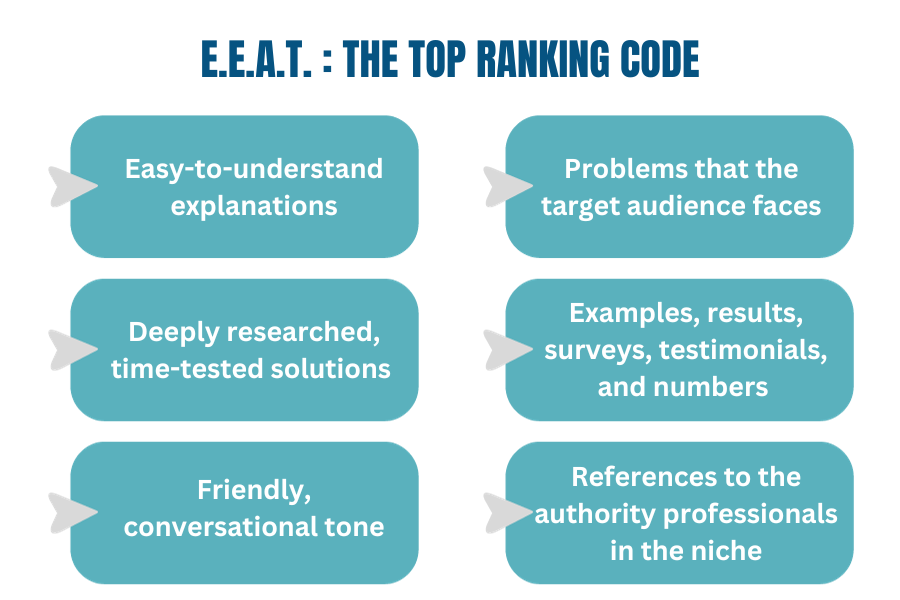
10. Easy-to-understand explanations
The first thing is that the explanations and paragraphs should be small and easy to understand because if you can’t explain something in simple terms, you’re not an expert at it. Got it??
11. Problems that the target audience faces
Are you a marketer, a blogger, or a writer who wants to know the secrets to ranking their blogs on Google??
Such questions that hit the pain points of the customers build a very deep attachment. The customer thinks, “This man understands my problem and my pain so well.“ This builds a very deep connection through empathy, as being understood is a very underrated pleasure.
12. Deeply researched, time-tested solutions
The best blog content focuses on issues and problem-solving. It should provide a solution to a previously unsolved problem or introduce a completely new, faster, and easier way of solving an already solved problem.
13. Examples, results, surveys, testimonials, and numbers
By adding examples, surveys, and numbers, the audience will understand that the brand is highly knowledgeable and thus expert. While all are mainly talking theories,you are stating facts.
Testimonials and results will make them trust you even more through social proof or the bandwagon theory. Their minds will go like, “Others have got results, so would I.” Making you even more expert, authoritative, and trustworthy
14. Friendly, conversational tone
Conversational writing has the feel of a one-on-one discussion between you and your readers. It’s genuine, important, and timely. It should establish a sense of connectivity, ideally by employing language and phrases that the audience is comfortable understanding. It also avoids stodgy words and phrase structures at all costs! You use plain terms for this, not jargon or complicated ones.
15. References to the authority professionals in the niche
When you write something for the web, you’re writing it for others to read. Moreover, you’re writing it to establish yourself as an authority on the subject. People who read your fresh material want to know they can trust it. Also, you want to express that you aren’t just making stuff up; these facts have been approved by authority figures.
User Experience for Blogs

“User experience in blogging is like hospitality in a fine dining restaurant—it keeps your guests coming back for more.” – Emily Davis
16. Readability
Readability describes how simple it is to read and understand your blog content. It may have a significant influence on your SEO score and determine how likely consumers are to engage with and profit from your content.
When your blog post is easy to read and understandable to your target audience, it pleases both readers and search engines. For this, you can use the Hemingway Editor app. It is free and makes your work way easier.
17.One-liners
A one-liner is a brief description of what your company does. It is intended to be brief, concise, and memorable. When individuals hear these short, catchy, and creative one-liners, they must develop a sense of enjoyment and entertainment while reading.
18. Highlighters
If you’re writing a blog and come across a sentence that especially speaks to your customer, use highlighters.
Bold, Underline, Italics, Capitalization, and coloring are all ways of highlighting content. So have a list of types of content and the type of highlighter you will use for each type of content. Your highlights will be visible to your readers as they read them. They will be able to communicate with you more effectively.
19. Lists
Lists make it simpler to absorb information while writing for a broad audience. They are a common way to share information about a variety of things and also make content UX-friendly.
There are 2 types of lists, and they must be used as per their usage.
Ordered lists: These lists are best for lists in which the pointers need to be in sequence.
Unordered lists or bullets: These can be used when there is no order or sequence needed for pointers
20.Tables
Tables frequently give a good, clean arrangement of the article’s material. This implies that people can see what arguments you’re making and what information you’re offering with just a single glance. It entices readers and is super UX-friendly.
21. Charts
A chart is a visual representation of the relationship between different data sets that uses text, symbols, and/or visuals. They are a common way to share information in a variety of venues. Charts may help individuals understand and recall information better. After all, our subconscious thinks in pictures, not words.
22. Diagrams, memes, and GIFs
Your blog is an important component of your website. It is the most effective method for adding content, targeting keywords, and increasing the value of your online site. The majority of people refer to GIFs as brief looping movies inserted into a web page.
Incorporating GIFs, diagrams, and memes into blog articles is an excellent method to represent the content in more visually appealing and engaging ways.
On-Page SEO

“A blog without on-page SEO is like a book without a title. How will anyone find and appreciate the masterpiece within?” – Mark Roberts
23. Meta Titles
Because search engines use these names to traverse the subject of your page and rank it accordingly, creating great meta titles is essential for efficient SEO strategies and ranking in organic search. Make sure to write an attention-grabbing headline along with relevant use of Keywords in it.
24. Meta Description
If you want the best tips for faster blog ranking, focus on meta descriptions. The paragraph of text that appears after the blue link in a search result is known as meta description. While meta descriptions don’t directly affect your ranking, they do affect your CTR, which affects the performance and thus helps in maintaining the ranking.
25. Alt text
A web page’s images are described via alt text (alternative text). When an image fails to load, alt text is shown on the website to assist visually impaired individuals and search engine bots in understanding what the image depicts.
26. Internal linking
Internal links connect relevant sections of your website’s content. It’s a simple yet efficient approach for me to get the most out of my traffic.
27. Backlink
An anchor text link from one website to another is referred to as a backlink. Many people put it in off-page, and they are not wrong, but backlinks in a blog increase its authority and trustworthiness and thus we are mentioning it here.
Conclusion
Concluding this blog, we have equipped you with a powerful 27-point checklist to make your blog rank faster on SERP . If you follow these, you can easily make your blog rank. But if you are competing with giant brands in your industry, the overall authority and SEO optimization of your website do come into play, so work on your overall website as well as your blog. Some may say that this is too much to do for a blog, but remember what Thomas Mann has said:
“A writer is someone for whom writing is more difficult than it is for other people.”
So behave like a writer and put in all the effort. See you soon with another blog. Until then, best of luck with your SEO.

Pranav Jha
I'm Pranav Jha, a Digital Marketing Consultant with over 14+ years of expertise. As the founder of AP Web World, a Google Partner Agency, I specialize in delivering results through SEO, Google Ads, and comprehensive digital marketing strategies. Through my professional blog, I share industry insights and proven strategies to empower fellow marketers and entrepreneurs. I believe that sharing knowledge creates opportunities for success across the global business landscape.